

Getting rid of a console usually means making peace with leaving a backlog behind, but the Linux gaming ecosystem keeps chipping away at those walled gardens. Enter Xodus Nexus, a rather cheeky piece of software that bridges the gap between Microsoft’s ecosystem and Linux devices like my Bazzite powered ROG handheld.
Installing it is simple enough via terminal:
curl -fsSL https://raw.githubusercontent.com/domsvoboda/xodus-nexus/main/scripts/install.sh | bashIt needs glibc 2.38 or newer under the hood, which most modern rolling or up-to-date distros sort out of the box. Once the launcher itself is up and running, there is one golden rule you can’t skip: pop straight into the settings menu to download and install the required Nexus runtime, otherwise your games will just sit there refusing to cooperate.
Facing the Library and Missing Roads
Firing up the app for the first time always brings that moment of truth regarding what actually works. Sadly, Forza Horizon 4 isn’t supported which stings a bit, seeing as it’s easily one of my most-played games over the years. Even with newer entries sitting in my Steam library, nipping back to the virtual Cotswolds and Edinburgh has a certain charm that’s hard to replace. At least the software handles these limitations honestly rather than letting you smash your head against a wall.
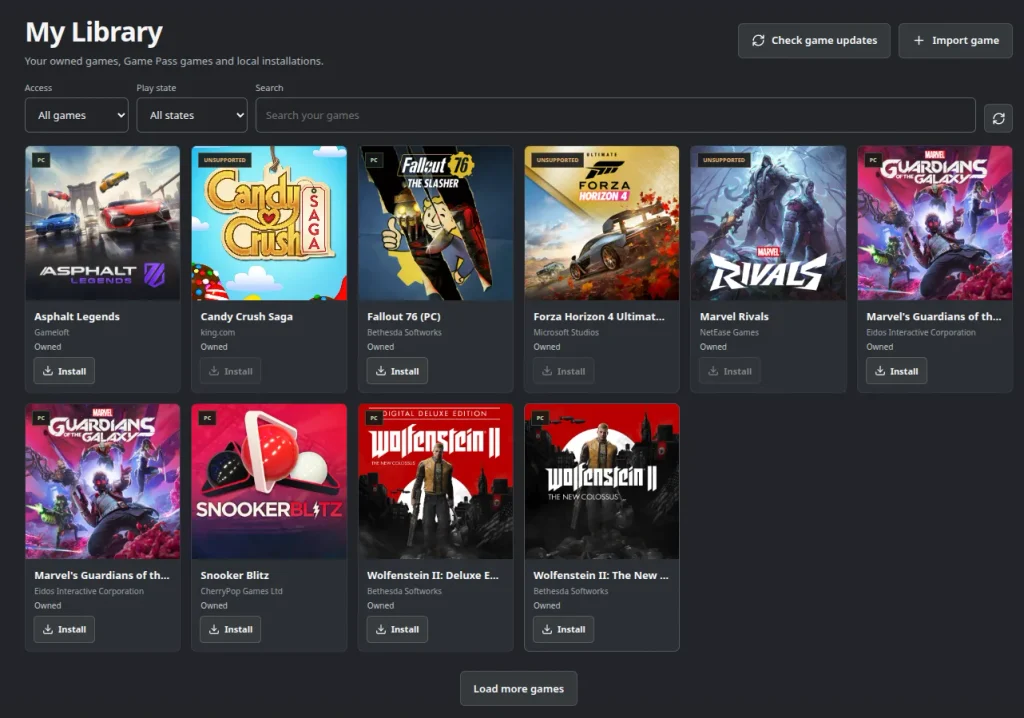
Meanwhile, some titles are missing entirely like Star Trek: Resurgence, which I also own. That’s less the fault of the software and more down to the grim reality of licensing expiration and storefront de-listings. Star Trek Resurgence is being de-listed and has already been removed from Steam and Xbox.
Cracking Open Game Pass on Linux
The real elephant in the room, though, is PC Game Pass. Historically, Microsoft’s subscription walled garden has been a right pain on Linux, usually forcing users into messy dual-boot setups or clunky streaming workarounds but Xodus Nexus attempts to crack that open
Compatibility is still a bit of a mixed bag depending on the specific title, but managing authentication, licensing, and downloads natively within a handheld launcher feels a bit like digital witchcraft. Which raises the eternal question: what is Microsoft’s official stance on all this?
So far, Redmond has maintained absolute radio silence. They haven’t blessed the project, but they haven’t swung a sledge hammer either. You’d think corporate security would hyper-ventilate over a third-party wrapper poking at their GDK plumbing, but a pragmatic part of me wonders if bean counters might quietly view an extra subscription fee from a stubborn Linux user as a win. For now, it lives safely in that wonderful grey area of open-source ingenuity.
Game Mode Flow and Seamless Integration
Usability-wise, you don’t even need Desktop Mode past the initial terminal script. Subsequent game installs can be handled right inside Game Mode. Sure, the interface gives you a fairly compact window to work within, but game pad navigation works without a fuss. Once a game is installed, clicking manage and adding it straight to Steam works a treat.
Pair that with a bit of SteamGridDB magic for custom artwork, and your remote Xbox shortcuts look entirely native sitting alongside your standard Steam titles. Firing up Guardians of the Galaxy proved the point, aside from a touch unfriendly pre-game settings launcher (which is the game’s quirk, not Xodus Nexus, it pulled down my ancient cloud saves and ran smoothly from where I left off years ago.
It’s a fantastic addition to the Linux gaming armoury, opening up another door for titles that would otherwise remain stranded on Microsoft’s servers.